

Visualisation and post-processing#
Objectives
More in-depth understanding of post-processing in FESTIM
Let’s create a 1D simulation.
import festim as F
import numpy as np

my_model = F.Simulation()

my_model.mesh = F.MeshFromVertices(
    vertices=np.linspace(0, 1, num=1000)
)

my_material = F.Material(id=1, D_0=1, E_D=0.2)
my_model.materials = my_material

my_model.traps = F.Trap(k_0=1, E_k=0, p_0=0.1, E_p=0, materials=my_material, density=0.5)

# temperature varying in space and time
my_model.T = F.Temperature(500 + F.x + F.t)

my_model.boundary_conditions = [
    F.DirichletBC(
        surfaces=[1, 2],
        value=1 + F.x,  # 1 in x=0, 2 in x=1
        field=0
        )
]

my_model.settings = F.Settings(
    absolute_tolerance=1e-10,
    relative_tolerance=1e-10,
    final_time=100
    )

my_model.dt = F.Stepsize(0.1, stepsize_change_ratio=1.1, dt_min=1e-5)
/home/docs/checkouts/readthedocs.org/user_builds/festim-workshop/conda/festim1/lib/python3.11/site-packages/mpmath/libmp/libintmath.py:75: DeprecationWarning: bitcount function is deprecated
  warnings.warn("bitcount function is deprecated",
/home/docs/checkouts/readthedocs.org/user_builds/festim-workshop/conda/festim1/lib/python3.11/site-packages/mpmath/libmp/libintmath.py:75: DeprecationWarning: bitcount function is deprecated
  warnings.warn("bitcount function is deprecated",
/home/docs/checkouts/readthedocs.org/user_builds/festim-workshop/conda/festim1/lib/python3.11/site-packages/mpmath/libmp/libintmath.py:75: DeprecationWarning: bitcount function is deprecated
  warnings.warn("bitcount function is deprecated",
/home/docs/checkouts/readthedocs.org/user_builds/festim-workshop/conda/festim1/lib/python3.11/site-packages/mpmath/libmp/libintmath.py:75: DeprecationWarning: bitcount function is deprecated
  warnings.warn("bitcount function is deprecated",
/home/docs/checkouts/readthedocs.org/user_builds/festim-workshop/conda/festim1/lib/python3.11/site-packages/mpmath/libmp/libintmath.py:75: DeprecationWarning: bitcount function is deprecated
  warnings.warn("bitcount function is deprecated",
/home/docs/checkouts/readthedocs.org/user_builds/festim-workshop/conda/festim1/lib/python3.11/site-packages/mpmath/libmp/libintmath.py:75: DeprecationWarning: bitcount function is deprecated
  warnings.warn("bitcount function is deprecated",
/home/docs/checkouts/readthedocs.org/user_builds/festim-workshop/conda/festim1/lib/python3.11/site-packages/mpmath/libmp/libintmath.py:75: DeprecationWarning: bitcount function is deprecated
  warnings.warn("bitcount function is deprecated",
/home/docs/checkouts/readthedocs.org/user_builds/festim-workshop/conda/festim1/lib/python3.11/site-packages/mpmath/libmp/libintmath.py:75: DeprecationWarning: bitcount function is deprecated
  warnings.warn("bitcount function is deprecated",
/home/docs/checkouts/readthedocs.org/user_builds/festim-workshop/conda/festim1/lib/python3.11/site-packages/mpmath/libmp/libintmath.py:75: DeprecationWarning: bitcount function is deprecated
  warnings.warn("bitcount function is deprecated",
/home/docs/checkouts/readthedocs.org/user_builds/festim-workshop/conda/festim1/lib/python3.11/site-packages/mpmath/libmp/libintmath.py:75: DeprecationWarning: bitcount function is deprecated
  warnings.warn("bitcount function is deprecated",
/home/docs/checkouts/readthedocs.org/user_builds/festim-workshop/conda/festim1/lib/python3.11/site-packages/mpmath/libmp/libintmath.py:75: DeprecationWarning: bitcount function is deprecated
  warnings.warn("bitcount function is deprecated",
/home/docs/checkouts/readthedocs.org/user_builds/festim-workshop/conda/festim1/lib/python3.11/site-packages/mpmath/libmp/libintmath.py:75: DeprecationWarning: bitcount function is deprecated
  warnings.warn("bitcount function is deprecated",
/home/docs/checkouts/readthedocs.org/user_builds/festim-workshop/conda/festim1/lib/python3.11/site-packages/mpmath/libmp/libintmath.py:75: DeprecationWarning: bitcount function is deprecated
  warnings.warn("bitcount function is deprecated",
/home/docs/checkouts/readthedocs.org/user_builds/festim-workshop/conda/festim1/lib/python3.11/site-packages/mpmath/libmp/libintmath.py:75: DeprecationWarning: bitcount function is deprecated
  warnings.warn("bitcount function is deprecated",
/home/docs/checkouts/readthedocs.org/user_builds/festim-workshop/conda/festim1/lib/python3.11/site-packages/mpmath/libmp/libintmath.py:75: DeprecationWarning: bitcount function is deprecated
  warnings.warn("bitcount function is deprecated",
/home/docs/checkouts/readthedocs.org/user_builds/festim-workshop/conda/festim1/lib/python3.11/site-packages/mpmath/libmp/libintmath.py:75: DeprecationWarning: bitcount function is deprecated
  warnings.warn("bitcount function is deprecated",
/home/docs/checkouts/readthedocs.org/user_builds/festim-workshop/conda/festim1/lib/python3.11/site-packages/mpmath/libmp/libintmath.py:75: DeprecationWarning: bitcount function is deprecated
  warnings.warn("bitcount function is deprecated",
/home/docs/checkouts/readthedocs.org/user_builds/festim-workshop/conda/festim1/lib/python3.11/site-packages/mpmath/libmp/libintmath.py:75: DeprecationWarning: bitcount function is deprecated
  warnings.warn("bitcount function is deprecated",
We now want to export the temperature, the mobile concentration field, and the total retention (mobile + trapped).
Note: in 1D, to visualise the XDMF files in Paraview, the
checkpointargument needs to beFalse(see #134)
export_folder = "task05"

xdmf_exports = [
    F.XDMFExport(field="solute", filename=export_folder + "/hydrogen_concentration.xdmf", checkpoint=False),
    F.XDMFExport(field="retention", filename=export_folder + "/retention.xdmf", checkpoint=False),
    F.XDMFExport(field="T", filename=export_folder + "/T.xdmf", checkpoint=False),
]
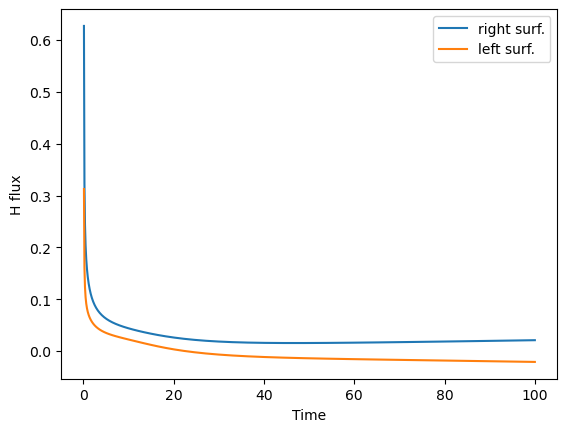
We would also like to visualise the total hydrogen inventory, the particle fluxes at the surfaces, and the average temperature.
derived_quantities = F.DerivedQuantities(
    [
        F.TotalVolume(field="retention", volume=1),
        F.HydrogenFlux(surface=1),
        F.HydrogenFlux(surface=2),
        F.AverageVolume(field="T", volume=1)
    ],
    filename=export_folder + "/derived_quantities.csv",
    show_units=True,
)

my_model.exports = [derived_quantities] + xdmf_exports
my_model.initialise()

my_model.run()
Several files were created.
The XDMF files can be opened in Paraview for visualisation.
The derived_quantities.csv file can be read in Excel, or programmatically in python.
# load the csv file with numpy
data = np.genfromtxt(export_folder + "/derived_quantities.csv", delimiter=",", names=True)

# print the columns names
print(data.dtype.names)
('ts', 'Total_retention_volume_1_H_m2', 'solute_flux_surface_1_H_m2_s1', 'solute_flux_surface_2_H_m2_s1', 'Average_T_volume_1_K')
print(data["ts"])
[  0.1          0.21         0.331        0.4641       0.61051
   0.771561     0.9487171    1.14358881   1.35794769   1.59374246
   1.85311671   2.13842838   2.45227121   2.79749834   3.17724817
   3.59497299   4.05447028   4.55991731   5.11590904   5.72749995
   6.40024994   7.14027494   7.95430243   8.84973268   9.83470594
  10.91817654  12.10999419  13.42099361  14.86309297  16.44940227
  18.1943425   20.11377675  22.22515442  24.54766986  27.10243685
  29.91268053  33.00394859  36.40434344  40.14477779  44.25925557
  48.78518112  53.76369924  59.24006916  65.26407608  71.89048369
  79.17953205  87.19748526  96.01723378 100.        ]
import matplotlib.pyplot as plt

plt.plot(data["ts"], data["solute_flux_surface_2_H_m2_s1"], label="right surf.")
plt.plot(data["ts"], data["solute_flux_surface_1_H_m2_s1"], label="left surf.")
plt.legend()
plt.xlabel("Time")

plt.ylabel("H flux")
Text(0, 0.5, 'H flux')
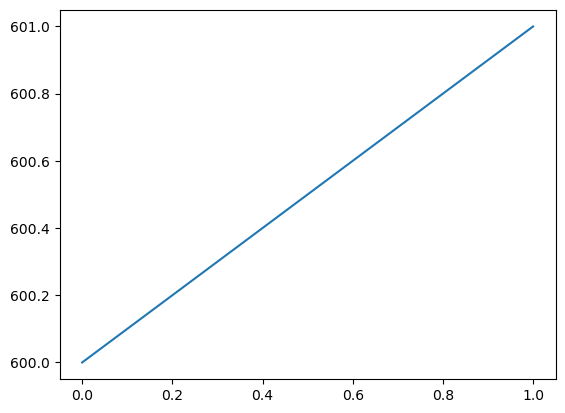
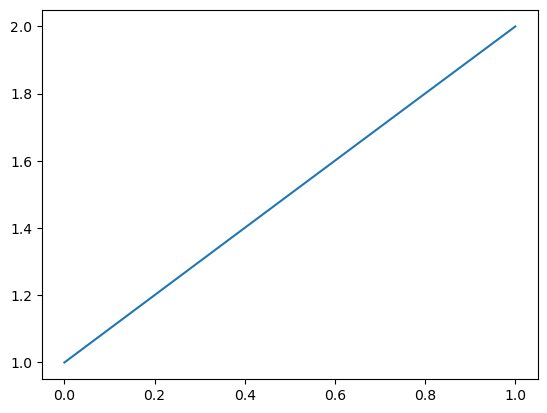
Alternatively, one can use the plot function of FEniCS to plot fields directly.
from fenics import plot

plot(my_model.T.T)
[<matplotlib.lines.Line2D at 0x7494f5af1790>]
plot(my_model.h_transport_problem.mobile.solution)
Calling FFC just-in-time (JIT) compiler, this may take some time.
[<matplotlib.lines.Line2D at 0x7494f5856a90>]
If the workshop if being run in GitHub codespaces, the XDMF files will not be readable in Paraview, however this is how they should look:
Temperature field:
Temperature profile:
Mobile concentration and retention profiles: